Want to sell privately but still reach buyers on Domain? The key to understanding how to get my property on domain.com.au is knowing that private owners can’t publish a residential sale listing directly. Domain requires a licensed intermediary to submit the listing, so it helps to understand the authorised route before preparing your advert.
Getting an authorised listing published and choosing how it appears in search results are separate steps. Kincade International Direct Sales (KIDS) acts as a licensed intermediary, giving private sellers a route to Domain exposure while they retain control of the sale. You manage your listing and enquiries, with enquiry forwarding and a 24/7 seller dashboard included in every package.
This guide explains the listing process, what information to organise and how portal listings differ from paid visibility products. It also covers the KIDS package options, including professional photography and, in some packages, a floorplan redraw and social media advertising. With accurate property details and a careful review of the advert, you can approach online exposure with more confidence and stay involved throughout.
Key Takeaways
- Separate the authorised listing route from any decision to pay for greater visibility.
- Prepare accurate property details, a clear description, quality images and information about inclusions before the listing is submitted.
- Organise relevant sale documents and engage a qualified conveyancer or solicitor for legal advice and documents.
- Kincade International Direct Sales (KIDS) provides private sellers with a licensed intermediary route to list on Domain.
- Compare the Classic, Signature and Prestige fixed-fee packages by their inclusions, support and presentation features.
Can a private owner get a property on Domain.com.au directly?
No. Private individuals can’t create and publish a residential sale listing directly on Domain.com.au. A licensed intermediary must submit it. The intermediary uses its authorised portal access to publish the listing, while the seller retains control of key decisions about the sale.
Owning a home and deciding to sell it doesn’t automatically provide the portal permissions needed to upload a listing. The route for how to get my property on domain.com.au as a private seller is to use a licensed intermediary, rather than trying to publish the advert through an individual account.
Why Domain listings use an authorised intermediary
Domain’s help resources describe listing tasks through an agent-facing system, including Agent Admin tools for creating and managing listings. These tools explain how a property advert can be managed once it is in the portal, but private owners can’t publish directly. Domain Group operates Domain Group’s real estate portal as part of its property platform. A seller’s authority to decide how a home is marketed is separate from the portal access needed to publish its listing.
Kincade International Direct Sales (KIDS) acts as a licensed intermediary for Domain listings. It provides the authorised portal route for a private seller’s listing without taking over decisions about the sale. You remain the owner and decision-maker, while KIDS submits the listing through its intermediary access.
What getting listed on Domain does, and does not, mean
A Domain listing is an advertisement that presents your property details to people browsing the portal. It gives prospective buyers a way to discover the property and make an enquiry. It is not an offer, a buyer commitment or a completed sale.
What happens after publication depends on the conversations between you and prospective buyers. Enquiries may lead to discussions and negotiations, but neither follows automatically from a listing. Publication also cannot guarantee a particular sale price or outcome. Portal exposure is one part of a private sale, not the whole process.
Listing access and paid visibility products are different things. A standard listing does not automatically mean promoted placement, a particular search position or display advertising. Those are separate advertising choices. Understand what the listing package includes and distinguish that from any separate visibility product. This helps you decide what you need without mistaking publication for an upgrade.
How to get your property on Domain.com.au: the private seller’s steps
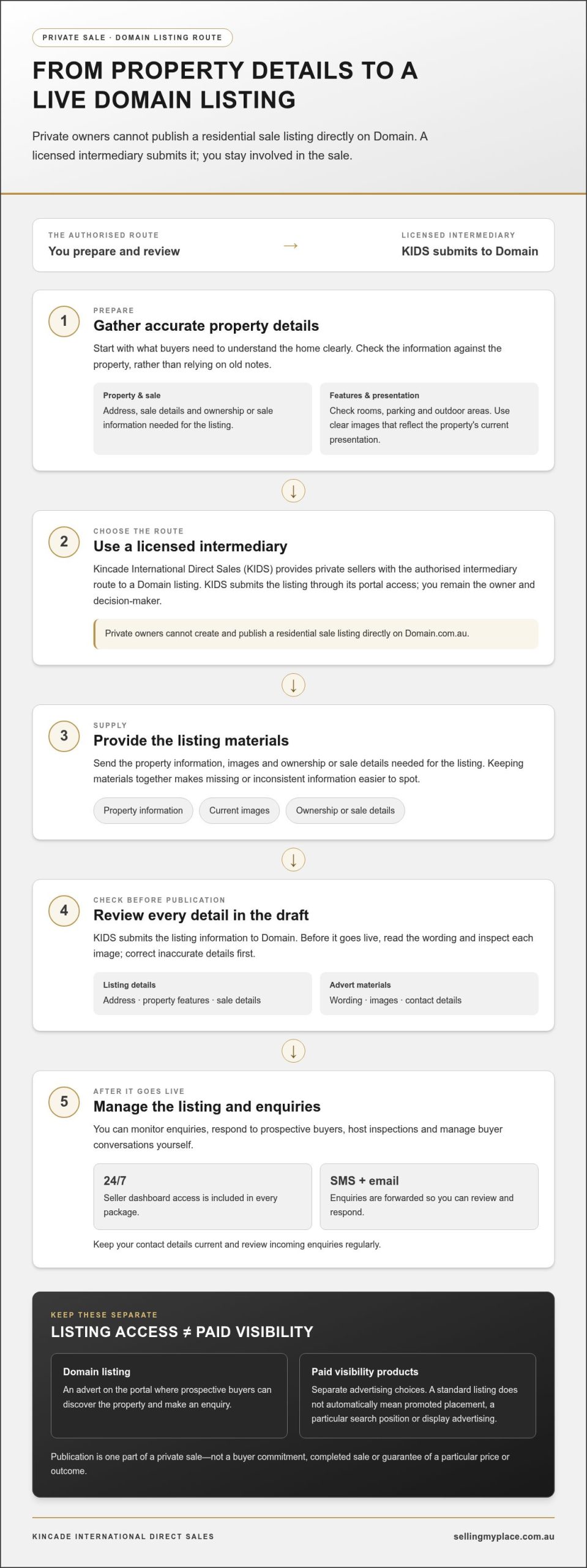
For a private owner, the process is easier to manage when you separate preparing the advert from submitting it to the portal. If you’re asking how to get my property on domain.com.au, the practical steps are to organise accurate property information, use a licensed intermediary to submit the listing, review it carefully and then manage the listing and buyer enquiries.
- Prepare the property details. Gather the address, sale details and a clear description of the home. Check features such as rooms, parking and outdoor areas against the property itself, rather than relying on old notes.
- Choose the listing route. Kincade International Direct Sales (KIDS) provides a licensed intermediary route for private sellers who want a Domain listing.
- Supply the materials. Provide the property information, images and ownership or sale details needed for the listing. Keeping these together makes it easier to spot missing or inconsistent information.
- Review the draft. Check the wording, images and contact details before publication. Correct inaccurate details before the listing goes live.
- Manage the listing. Monitor enquiries and respond to prospective buyers in a way that suits your sale plans. You can also host inspections and manage buyer conversations yourself.
Prepare the property information before starting
Consider what a buyer needs to understand at a glance. A useful description presents the home’s features clearly and accurately, without overstating them. Images should show the property being marketed and reflect its current presentation. If a feature has changed, update the description or provide current images rather than leaving buyers with an outdated impression.
Gather the ownership and sale information needed for the listing process, too. Having it ready helps the intermediary prepare the submission and identify details that need your attention. This is a practical preparation step, not a replacement for sale documents or professional legal advice.
Submit, review and manage the listing
Once you’ve supplied the materials, KIDS submits the listing information to Domain through its licensed intermediary access. Before publication, read every line and inspect each image. Check the address, property features, sale details and contact information closely. Small errors can confuse buyers and create extra work later.
After publication, the 24/7 seller dashboard included in every package lets you manage your listing, while enquiries are forwarded by SMS and email. Keep your contact details current and review incoming enquiries regularly so you can respond thoughtfully and maintain an accurate picture of the property.
A private owner gets a Domain listing live by preparing accurate property information, supplying it to a licensed intermediary and reviewing the advert before publication. If you’d like support with the authorised submission route, discuss your Domain listing process with KIDS.
Domain listing versus upgrades: what private sellers should understand
Getting a property published on Domain and paying to promote it are separate decisions. The first is about having a listing on the portal. The second concerns advertising products that may affect how a listing is displayed or seen. Domain’s upgrade guidance describes products for agents and advertisers, so it is useful to understand the distinction between a listing and a promotional campaign.
That distinction matters when you’re working out how to get my property on domain.com.au. Start with the listing route and what your selected package includes. Treat promoted placement as a separate advertising choice, not a condition for appearing on the site or a promise of more buyer interest.
| Option | What it means | What to keep in mind |
|---|---|---|
| Standard listing presence | The property advert is published on Domain for users to view. | Publication alone doesn’t promise a promoted position or a particular place in search results. |
| Paid visibility products | Domain’s agent-focused guidance describes listing upgrades that can influence search-result order or presentation. Examples include Top Spot and other advertising tiers. | These are distinct from getting the property listed. A promoted position is not the same as a standard listing. |
| Display advertising | Separate advertising products can promote a property or reach potential buyers through digital channels. Domain’s materials include eBrochures and Audience Boost. | Display advertising is a campaign option, not the same thing as a standard listing, and doesn’t guarantee enquiries or a sale. |
What Domain upgrades and display products are for
Domain’s agent-focused help content describes upgrades as ways to change a listing’s position or presentation within the portal. It also outlines display products that promote property advertising through other digital placements. These descriptions help explain the difference between a listing and a campaign. They are not a promise of access, a guaranteed ranking or a requirement to upgrade.
Think about exposure without overpromising
A clear, complete listing helps buyers understand what’s being offered. Accurate details, considered wording and strong presentation give the advert a solid foundation, whether or not additional advertising is used. A promoted placement may create a visibility opportunity, but it can’t create buyer demand or determine what someone will offer.
No placement guarantees a sale or a particular sale price. Enquiries, negotiations and the final outcome depend on factors beyond where an advert appears. Focus first on getting the listing information right and understanding what your selected package includes. Any upgrade decision is separate and should be considered on its own merits.
What to prepare before your Domain property listing goes live
Preparation makes it easier to create an accurate, clear listing that is ready for buyer enquiries. If you’re working out how to get my property on domain.com.au, treat the pre-publication review as a chance to catch missing details before they reach prospective buyers. Gather your property information, images, contact preferences and relevant sale documents, then check them against one another.
Check listing details and presentation
Read the description as a buyer would. Does it explain the home clearly, and do the stated features match the property? Check every detail against what’s actually being offered, including fixtures and other inclusions. Choose clear, current photographs that accurately represent the property. The aim is an honest, helpful impression, not a presentation that leaves buyers expecting something different.
- Property details: Check the address, sale information and description for accuracy and consistency.
- Features and inclusions: Verify room details, parking, outdoor areas and anything else mentioned in the advert. Be precise about what stays with the property.
- Images: Review every photograph for clarity and make sure it shows the property being marketed as it is now.
- Contact preferences: Confirm the contact details and preferred way for enquiries to reach you. Decide who will monitor messages and respond to interested buyers.
- Supporting information: Keep relevant ownership and sale information organised, and note any questions to resolve before the advert is submitted.
Make one final pass through the draft once the wording and images are together. A room described as having a particular feature should be represented accurately, and an inclusion named in the description should match what you intend to offer. These checks help reduce avoidable misunderstandings later.
Keep legal documents with the right professional
Preparing advertising information and preparing legal sale documents are separate tasks. Requirements vary between Australian states and territories, so don’t treat a listing checklist as legal guidance or assume one process applies everywhere. Engage a qualified conveyancer or solicitor to advise on and prepare or review the contracts and other documents relevant to your sale.
Kincade International Direct Sales (KIDS) supports the listing process as a licensed intermediary, but doesn’t provide legal advice, contracts or conveyancing services. Keeping that distinction clear helps you organise the right support: KIDS can submit the listing, while your conveyancer or solicitor handles legal matters.
Before approving the advert, check that the property details, images and contact preferences are correct, and address document questions with your legal professional. Get support preparing your Domain property listing with KIDS.
Get your property on Domain through Kincade International Direct Sales
If you’re weighing up how to get your property listed on Domain as a private seller, Kincade International Direct Sales (KIDS) provides the licensed intermediary route. KIDS submits private property listings to Domain, while you retain control of your listing details and buyer enquiries. You handle the sale decisions and inspections; KIDS provides the portal access and marketing package.
KIDS offers three fixed-fee packages, each priced ex GST: Classic at $799, Signature at $999 and Prestige at $1,999. The listed features are bundled into the selected package, so compare the inclusions that matter to you, such as photography, signboard size, support and advertising. Every package includes listing on Domain, Realestate.com.au and local portals, enquiry forwarding by SMS and email, 24/7 seller dashboard access and a Market Valuation Report.
What the KIDS listing pathway provides
Classic includes professional photography, a 600 × 900 mm For Sale signboard, email expert support, a dedicated website and URL, and international network access. Signature includes everything in Classic, with a larger 1200 × 1800 mm signboard and email and phone expert support. Signature also includes a dedicated property website and URL.
Prestige includes everything in Signature, plus 15-20 professional photographs, a floorplan redraw, a Facebook and Instagram ad campaign, 50 premium A4 property brochures, a 1-on-1 dedicated specialist, a James Edition listing and a 1200 × 1800 mm photo signboard. It also includes priority access to the Kincade Global Network in the United Kingdom and the United States. These are package inclusions, not a promise of a particular search position or sale result.
KIDS acts as a licensed intermediary for listing purposes, not as a real estate agent. You retain control of your listing, enquiries and sale decisions through the 24/7 dashboard. Your listing remains active until sold, withdrawn or two years from the commencement date.
Choose a package and take the next step
Consider the presentation and support that suit your plans, then compare the package inclusions as a whole. Classic provides professional photography and email support; Signature adds phone support and a larger signboard; Prestige includes the broader marketing and specialist features listed above. All package prices are ex GST, with no commission payable to KIDS.
This route keeps you close to the process: KIDS provides licensed intermediary access, while you retain control of the listing and buyer conversations. A Domain listing can present your property to portal users, but it can’t guarantee a sale or a particular price.
If you’re ready to explore the listing route, talk with the team about getting your property on Domain. You can also select “Explore Packages” or “Get Started” on the KIDS website to review the fixed-fee options.
Take the next step towards your sale
Knowing how to get my property on domain.com.au helps make the first part of selling more manageable. Focus on what matters to you: how your home is presented, how you want to handle buyer conversations and what support you need. A clear plan gives you room to make informed decisions rather than feeling rushed.
You don’t need every detail settled before comparing package options. Review the inclusions, organise your property information and consider how you want to manage enquiries and inspections. The KIDS packages combine a fixed fee with portal listings and marketing features, while you remain in control of the sale.
Talk with the team about listing your property on Domain and take a clear, confident step towards putting your sale plans in motion.
Frequently Asked Questions
Can I list my property on Domain.com.au without an agent?
You can sell privately without appointing a traditional real estate agent, but you can’t publish a residential sale listing on Domain through an individual account. A licensed intermediary can submit it for you. Kincade International Direct Sales (KIDS) provides this route, so you can make your own sale decisions while using an authorised listing pathway. Selling privately and uploading directly to a property portal aren’t the same thing.
Is it legal to sell my property privately in Australia?
Yes. Australian property owners can sell privately in every state and territory. Selling without a traditional agent doesn’t remove your responsibilities as a vendor, and the paperwork can vary depending on where the property is located. Before marketing the home, speak with a qualified conveyancer or solicitor about the documents and steps that apply to your sale. They can advise on your circumstances.
Does getting listed on Domain guarantee that my property will sell?
No. A Domain listing advertises the property to portal users, but it can’t ensure that a buyer will enquire, make an offer or proceed to a completed sale. Listing views may not translate into an offer that suits you. Consider each enquiry on its merits, and seek appropriate professional advice for legal matters. Portal exposure is one part of selling, not a promised outcome.
Can I edit my property listing after it goes live?
Yes, sellers using KIDS can edit listing details through the 24/7 seller dashboard. If something changes, such as an inclusion or a contact preference, keeping the information current helps avoid confusion for prospective buyers. You can also use the dashboard to manage enquiries. Review edits carefully so the advert remains consistent across its description, features and images.
Do I need a Domain upgrade to have my property listed?
No. A paid visibility upgrade isn’t a prerequisite for a listing to appear on Domain. Upgrades and display advertising are separate choices from getting the property submitted and published. If you’re considering promoted placement, distinguish the advertising product from the standard listing and remember that it cannot guarantee a buyer or a particular sale price.
What documents should I have ready before listing my property?
Requirements depend on the state or territory. In NSW and the ACT, a Contract of Sale is required before listing. In Victoria, a Section 32 Vendor Statement must be provided before contracts are signed. These are examples, not a complete national checklist. Engage a qualified conveyancer or solicitor to identify and prepare the documents for your property.